Kubernetes rollouts and autoscaling can push PostgreSQL past its connection budget. Per-pool limits, transaction behavior and shutdown plans help control the load.
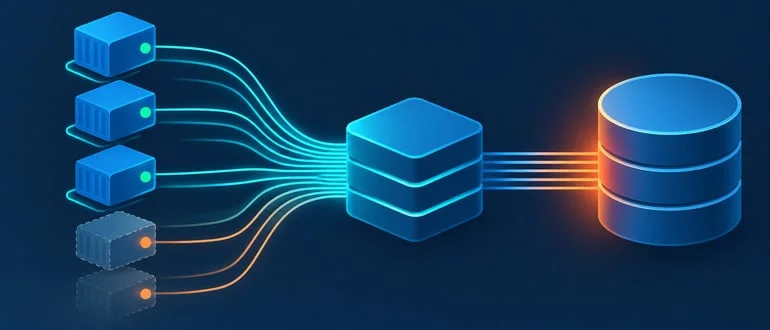
Kubernetes can exhaust PostgreSQL connections during an ordinary deployment, even when request volume hasn’t changed. New pods open pools while terminating pods may still hold sessions; worker processes multiply the demand. The practical challenge is to budget for that overlap and coordinate scaling, pooler limits and shutdown behavior.
Connection pools can absorb some churn, but they don’t create database capacity. When application replicas, PgBouncer instances and PostgreSQL each enforce separate limits, the total depends on how those limits interact during both steady operation and transitions. A useful capacity plan counts every connection owner, including pods that are draining.
Count connection demand across the rollout
Take an API deployment with 12 pods, four worker processes per pod and a maximum of five PostgreSQL connections per worker. If each process connects directly to the database, the deployment can open as many as 240 sessions. Adding three pods raises that ceiling to 300, before counting background jobs, migrations or connections held by terminating pods.
The calculation assumes pools connect lazily, so actual use may be lower. But a rollout can coincide with traffic, and a configured maximum still matters when sizing against PostgreSQL’s limits. Kubernetes documents cases where terminating pods make resource use exceed the expected replicas plus maxSurge. Those sessions belong in the database connection budget too.
Start with PostgreSQL’s max_connections. Subtract reserved slots and an operating buffer, then divide the remainder among workloads. Raising max_connections has a cost: PostgreSQL makes additional allocations, including shared memory. And available slots don’t indicate how many queries the database can run efficiently.
In the example, allocating 270 connections to the API would leave too little room for a rollout that can reach 300. Reduce per-worker pool sizes or put application connections through transaction poolers before increasing replicas.
Calculate PgBouncer capacity per instance
A PgBouncer sidecar gives each application pod a nearby pool, but scaling the application also creates more independent backend pools. A shared PgBouncer deployment can cap the number of PostgreSQL connections used across application replicas, though each PgBouncer instance has its own limits.
PgBouncer creates pools for database and user pairs. With three instances, four such pairs, reserve pools disabled and aggregate limits set to zero, the default default_pool_size=20 allows up to 240 backend connections in total. max_client_conn limits incoming clients; it doesn’t cap connections from PgBouncer to PostgreSQL.
Set max_db_connections and max_user_connections on each instance, then calculate the combined ceiling. Account for database aliases that point to the same PostgreSQL database, and for replicas that share poolers during updates. For example, three instances capped at 60 server connections each expose up to 180 connections. Adding a fourth raises that potential to 240.
Each instance also needs enough headroom to handle reconnecting clients if another pooler fails. A Kubernetes Service distributes new TCP connections among destinations, but established sessions stay with their current pooler. That can leave a newly added instance mostly idle while existing replicas have queues. Check load and waiting on each instance before treating a replica increase as a capacity fix.
Transaction pooling changes what applications can expect
In session mode, PgBouncer keeps a PostgreSQL backend assigned for the duration of a client connection. Persistent application pools can therefore hold database sessions open while idle. Transaction mode returns the backend to the shared pool after each transaction, letting more clients take turns using fewer PostgreSQL connections.
That sharing works only when the transaction is short. A backend remains occupied from the start to the end of an explicit transaction. If an application fetches rows, calls an external service and then commits, the database connection sits idle during the network call but remains unavailable to other clients. Move unrelated network work outside the transaction where possible, and consider idle_in_transaction_session_timeout to limit abandoned or stalled transactions.
Before switching modes, check application compatibility. Session-level advisory locks, LISTEN subscriptions and temporary tables that need to survive between transactions depend on a client retaining the same backend. Keep those workloads in a separate session pool or assign them dedicated connections.
Transaction-specific settings should use SET LOCAL inside a transaction. An initialization script that runs session-level SET can’t provide the same behavior when each transaction may use a different backend. Prepared statements also need testing: PgBouncer supports protocol-level prepared statements in transaction mode when max_prepared_statements is greater than zero, but that doesn’t preserve SQL PREPARE state across transactions. Verify the actual driver and ORM configuration.
Keep autoscaling from adding demand to a queue
Autoscaling based on request latency can make database contention worse. If the database is already the bottleneck, adding application pods creates more workers and client connections without increasing database throughput. CPU-based scaling may miss the same problem when workers are mostly waiting.
Backend occupancy helps explain the pressure. At 1,000 transactions per second and 20 milliseconds of average occupancy per transaction, Little’s Law gives roughly 20 busy backend connections. If occupancy reaches 200 milliseconds while throughput stays at 1,000 transactions per second, the average rises to about 200. These are steady-state estimates, not pool-size targets; lock waits and pauses inside a transaction count toward occupancy too.
Watch where requests wait: application pool acquisition, PgBouncer backend assignment or PostgreSQL execution. PgBouncer’s SHOW POOLS reports cl_waiting and maxwait, while PostgreSQL’s pg_stat_activity shows transaction start times and wait events.
Fit pool acquisition limits, PgBouncer’s query_wait_timeout and execution timeouts within the request’s overall deadline. PostgreSQL’s statement_timeout covers execution in PostgreSQL, not time spent waiting in an application pool or PgBouncer. Bound retries and propagate cancellations so expired requests don’t continue holding capacity.
When several PgBouncer instances sit behind a TCP load balancer, cancellation requests can arrive over a separate connection and reach another instance. Configure PgBouncer peering where needed. Keep liveness probes independent of routine pool exhaustion: restarting healthy application processes can discard their pools and create a fresh wave of connections. Admission limits or controlled failures give the database time to recover.
Make shutdown part of the connection plan
Readiness changes steer new traffic; they don’t close existing client sockets. On application termination, stop accepting work, finish or cancel transactions, then close the client pool. A PgBouncer sidecar should stay alive until application work has drained. Kubernetes native sidecars, defined as init containers with restartPolicy: Always, provide shutdown ordering that ordinary containers don’t guarantee.
When updating poolers, remove an instance from new-connection routing and drain its clients within terminationGracePeriodSeconds. A preStop hook uses time from that same grace period, so it needs to fit inside the shutdown budget.
PgBouncer 1.23 and later handle SIGTERM by waiting for clients to disconnect. Long-lived client pools can keep that shutdown from finishing; older PgBouncer versions terminate immediately on the signal. Check the deployed version, and arrange bounded, staggered reconnections before Kubernetes sends SIGKILL.
Database failover breaks established backend sockets. Use bounded reconnect backoff, and retry only transactions the application can safely replay. Then test the full connection plan under load during a rollout, with a slow database and long-lived clients, and with one pooler unavailable. Peak backend connections, acquisition delays and completed transaction throughput will show whether the design holds through the next change in replica count.
Discussion
Sign in to join the discussion.