Apple's macOS Sequoia introduces powerful AI features, iPhone mirroring, and a redesigned Calculator app, enhancing productivity and user experience.
Apple's latest operating system, macOS Sequoia, or version 15, has officially launched, bringing a suite of notable enhancements across its best desktop Macs. Unveiled at WWDC 2024, Sequoia offers a significant focus on artificial intelligence, embedding generative tools for images and text, alongside smarter file organization capabilities. As the integration of AI into everyday computing becomes increasingly common, Apple seems intent on staying at the forefront of this trend.
Exciting New Features and Functionality
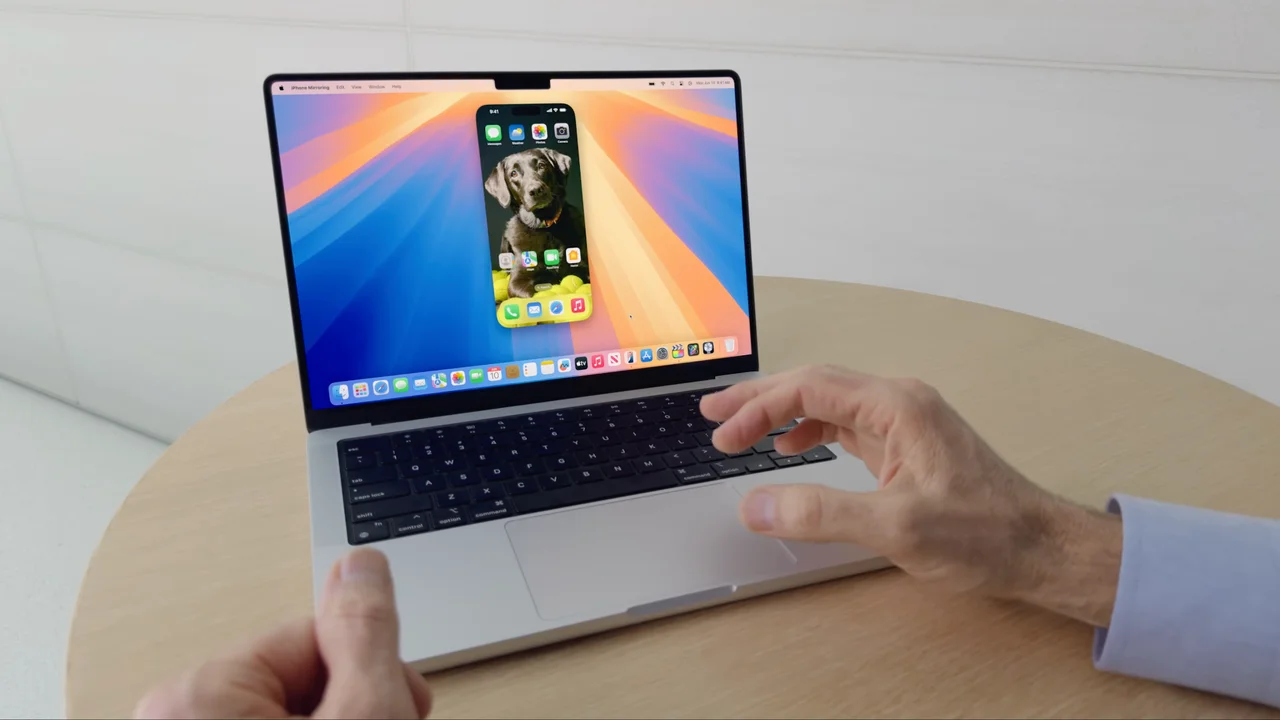
One standout feature is the iPhone Mirroring, allowing users to access any iPhone on their Mac, even when in StandBy Mode, making interoperability smoother than ever. This mirrors Apple's broader ecosystem approach, where devices work in sync to create a seamless user experience. Users can now drag and drop files between devices, send messages, and even access apps directly on their Macs with little hassle. With mobile and desktop workflows becoming blurrier, this feature could turn heads for those living in both worlds.
Additionally, the update introduces a Windows tiling feature for enhanced multitasking. Users can now snap windows together, improving productivity—especially for those who handle multiple applications simultaneously. Traditionally, Apple has been criticized for its less-than-stellar multitasking capabilities compared to Windows, and this enhancement may signal a response to user feedback.
There's also a revamped Passwords app aimed at aligning the user experience more closely with the Apple ecosystem. Managing passwords effectively has become paramount in a digital age where cyber threats loom large. Offering an intuitive interface and better integration with Apple's features, the new app will likely attract users looking for safer options. Apple seems to recognize that security isn’t just an add-on anymore; it’s a selling point.
Upgrading to macOS Sequoia
To upgrade to macOS Sequoia, users should navigate to the System Settings app on their Mac. From there, go to General and select Software Update to find macOS Sequoia. As always with new releases, initial installation times may be longer than expected due to high demand as users rush to download the update. Prepare for potential slowdowns; it’s not unusual for Apple’s servers to be overwhelmed during launch week.
Before embarking on this upgrade, it’s wise to conduct an iCloud backup of essential files. This precaution ensures your essential data—photos, documents, and applications—are secure. It's a small step that can save you from significant headaches later.
Additional Features of macOS Sequoia
The Calculator app has received a fresh new look and will integrate with Notes for more intuitive number management. More than just aesthetic changes, this integration could make tasks like budgeting or project estimates easier, especially for users who frequently juggle data. With Apple positioning itself as a more productivity-oriented platform, features like these signal an attempt to attract professionals who rely on seamless collaboration between apps.
Another pivotal element of this update is the introduction of Apple Intelligence, which aims to boost Siri’s performance, streamline Shortcuts creation, and enhance personal device customization. Users have wanted more from Siri; this update could be Apple's attempt to revitalize an assistant that some would argue has lagged behind competitors like Google Assistant or Alexa. The introduction of ChatGPT integration, which offers a new level of conversational AI, might also prove to be a major selling point, giving users access to broader informational resources right from their desktops.
This update will also pave the way for improved AI performance across various applications. This shift is important, as it positions Apple to compete in a tech environment increasingly defined by artificial intelligence. Expect this to open up possibilities for app developers, too, as they seek to create applications that can tap into these AI capabilities.
Another eagerly awaited feature is the introduction of window tiling, letting users snap windows together while they work, offering a notable boost to productivity on Silicon Macs. This could reinforce Apple’s appeal among work-from-home professionals and creative types who prize efficiency during multitasking scenarios.
Implications and Future Outlook
The move to enhance macOS with a focus on artificial intelligence and interoperability doesn’t come as a surprise. Apple has always positioned its software as a means to simplify user experiences, but the stakes seem higher than ever. Competition from other operating systems is fierce, particularly as users demand smarter, more intuitive interfaces. As functional AI continues to influence how we interact with our devices, this update could change the expectations users have toward not just Apple, but PC environments as a whole.
What this means for you, especially if you're working in this space, is a potential shift in how applications integrate AI features. Companies may need to rethink their strategies to stay relevant, especially if heavyweights like Apple are setting the bar higher for customer engagement. Keep an eye on how this might permeate through the industry as Apple rolls out more updates and refines its AI capabilities.
And yet, it’s essential for users to approach these new features with a critical eye. Are they enhancing productivity, or simply adding complexity? Only time will tell if these updates will meet the high expectations set by users and Apple alike.
Discussion
Sign in to join the discussion.