iOS 27.3 beta 2 lets iPhone Duo owners unlock with the front camera. It's convenient, but it lacks Face ID's depth sensing and payment authentication.
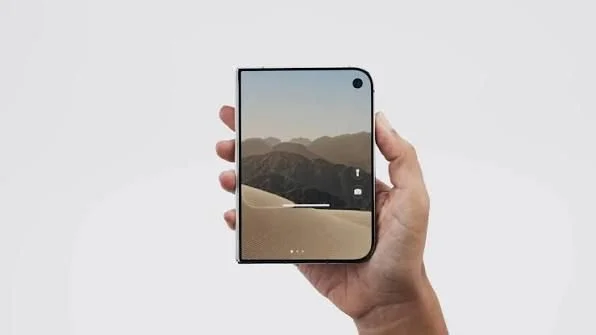
Apple's latest beta makes the iPhone Duo's closed screen easier to get past, but the trade-off is easy to miss. iOS 27.3 beta 2, released November 16, 2026, adds Unlock with Front Camera. It's a real convenience for anyone tired of reaching for Touch ID on a folded phone. It isn't Face ID, though, and the gap between the two matters more than a glance-to-unlock pitch suggests.
I've covered enough phone launches to be wary of any change that makes a security step feel smaller. Friction is a security feature, even when nobody designs it that way. Remove enough of it and people stop thinking about what they're unlocking. This beta isn't a dramatic shift, but small changes like this tend to become the default before anyone decides they should be.

What the feature actually does
You'll find the toggle under Settings > Touch ID & Passcode. It only works after you've recently authenticated with Touch ID or your passcode. After about 45 minutes of inactivity, the phone wants Touch ID again. So this is a shortcut layered on top of existing authentication, not a replacement for it.
If you're used to thinking of unlocking as a single event, this changes the picture. It's closer to a session that the camera can extend, and that session has an expiry. That's a sensible design, and it's the main reason I wouldn't call this a downgrade. Still, it's a new state the phone can be in, and that state deserves a moment of thought.
The beta also adds Close to Lock. Fold the Duo shut and it locks, rather than pushing your content to the outer display. That's a small change, but it shapes how you'd actually use the outer screen every day.
Most people will read that as a minor interface tweak. And yet it changes what the outer display is for. If the phone locks on close, the cover screen becomes a glance surface instead of a place where your content sits open. Anything visible there can be read by anyone standing nearby, so the lock behavior is a privacy choice as much as a convenience one. (and this is the part most people overlook) The outer screen is the one you'll show to someone across a table, so how it behaves matters more than the spec sheet suggests.
Why it isn't Face ID
Face ID depends on TrueDepth hardware, which captures depth information and an infrared image of your face. Apple says Face ID is designed to work in total darkness. Unlock with Front Camera uses the standard front camera instead. MacRumors' hands-on testing found it struggled in a dark room, which is exactly where the dedicated hardware earns its keep.
That's a hardware difference, not a software one, and it's why an update can't close the gap by itself. Similar systems typically rely on dedicated sensors for face-based authentication because a regular photo sensor doesn't measure depth. Standard cameras are built to capture color images, and they're more sensitive to lighting conditions than a system designed around infrared. Software can compensate for some of that, but it can't add a sensor that isn't there.
Testing in a dark room is a useful stress test. Dim conditions are common at night, in a bedroom or a low-lit restaurant, and they're where a camera-only system is most likely to hesitate. A convenience feature that works well in bright daylight and falters in the dark is still a convenience feature. It just has a narrower range than the name implies.
Here's the thing: without depth sensing, the security model is different. This is a convenience path, not a biometric upgrade, and it shouldn't be judged by the same standard. That doesn't make the feature bad. It makes it narrower. If you're in a security-conscious role, or you simply want a phone that's hard to open by accident, you'll want to know which path you're on at any moment. The difference won't be obvious from the screen.
What it won't unlock
The list is short, and that's the point. Each item marks a place where unlocking the phone could also unlock something else.
- Apple Pay: Camera unlocking doesn't authorize payments. Touch ID is still required.
- Passwords: It doesn't fill logins from the Passwords app either.
- The unfolded phone: Opening the Duo still requires Touch ID or your passcode.
That's the part worth remembering. A familiar glance doesn't mean the Duo has picked up Face ID's broader authentication support. Those are separate capabilities, and buyers should keep them separate. Payments and saved passwords are where a weak unlock would cost you real money or real access, so they stay behind the stronger check. Think of this feature as a door that opens the phone, not a key that opens everything inside.
Open questions
The testing so far covers everyday unlocking, not how easily someone else could fool the camera. Ease of use is easy to demonstrate in a hands-on video. Adversarial behavior is much harder to test, and it's the question that matters most for a feature guarding a phone. Nobody has published a clear answer yet. A standard camera doesn't settle the matter in either direction.
Timing is loose, too. MacRumors points to a December 2026 release for iOS 27.3, but without an exact date. Since this is a developer beta, treat that window as a rough guess rather than a schedule. Developer builds change quickly, and features can be tuned, renamed, or pulled before they reach the public. A feature that looks polished in a demo can behave differently once it meets a wide range of lighting and real users.
The bigger question is whether Apple sees this as a stopgap until the Duo gets Face ID, or as its long-term answer. I'd bet the company is still deciding, and the beta doesn't say. If it's the latter, the security results will decide whether the convenience is worth the trade.
What this means for you
If you're considering a Duo, judge the unlock feature on what it does on an ordinary day. It's useful for quick checks, like reading a notification or confirming a calendar entry, and it saves you a trip to Touch ID. Don't assume it replaces the authentication you already rely on. Read the restrictions list before you decide it's a reason to skip a different phone.
If you're working in a space where phone security matters, treat this as a new mode, not a new level. The phone's protections haven't been removed, but the path to get in has changed, and it's worth knowing when you're on the shortcut. That's a configuration question you can check yourself rather than wait for a review to answer.
Useful, but not reassuring. The feature solves a real annoyance, and it does so without pretending to be something it isn't. The open question is whether the camera holds up when someone is actively trying to fool it, and until that's tested in public, the honest answer is that nobody knows yet.
Discussion
Sign in to join the discussion.