Google has started rolling out its Motion Assist feature for Android 17, enhancing user safety and customization options while on the move.
Google has initiated a gradual rollout of Motion Assist, a feature designed for Android 17 users that aims to improve user experience while traveling. This announcement came earlier this week, marking the start of an update many expect to enhance both functionality and safety on the road. The timing of this release isn't random; as we see an increased reliance on mobile technology in vehicles, developers are prioritizing user safety and comfort. Google’s focus on these areas indicates its commitment to merging technology with everyday needs, but the success of this initiative will depend on user adoption and the actual efficacy of the new features.
Accessing Motion Assist
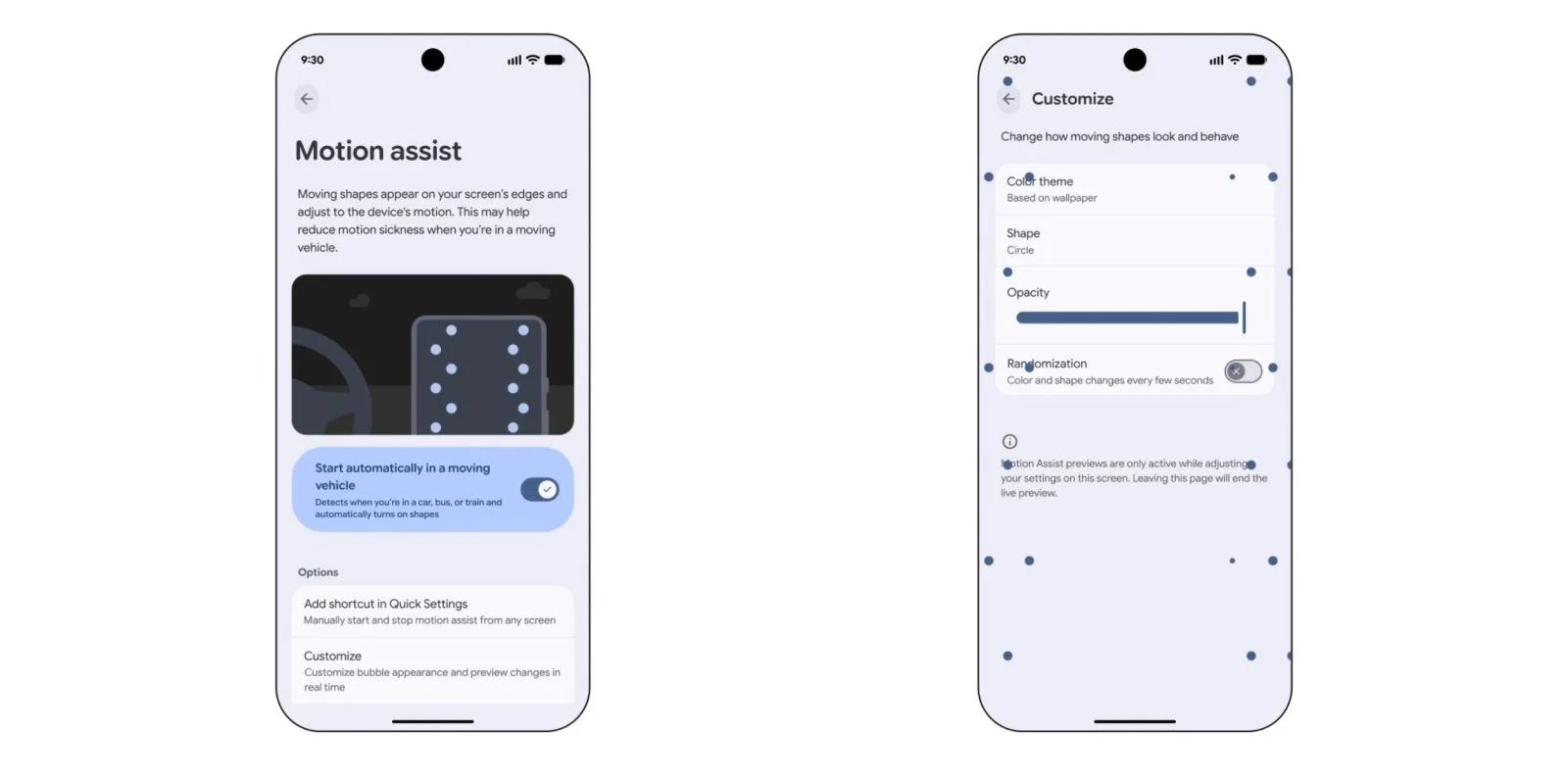
If you want to check if the feature is available on your device, you can simply search for “motion assist” within the Settings app. Alternatively, if you prefer navigating there manually, go to Settings → Google → All services tab → Personal & device safety → Motion assist. You’ll find it listed alongside Advanced Protection and Theft Protection under Google Play services. For some users, understanding how to access new features can be a hurdle. Google needs to ensure that these updates are not only innovative but also user-friendly in their implementation.
Activation and Features
Once enabled, users can set Motion Assist to automatically activate “when in a moving vehicle.” That’s a clever feature, aiming at minimizing distractions. Google also suggests adding a Quick Settings Tile for easier access, allowing users to turn it on or off from any screen. Notifications will make it easy to switch off Motion Assist with just a tap. The concern here, however, is how many users will actually take advantage of these features. People don’t always have the time or inclination to customize settings, particularly while on the go. If you're working in this space, you'll know that user engagement can make or break such features.
Customization Options
The customization menu allows users to adjust various settings, including:
- Color: System-based, Red, Yellow, Green, Blue
- Shape: Circle, Square, Pentagon, Diamond
- Opacity: Adjustable via a slider
- Randomization: Choose for colors and shapes to change every few seconds
These options seem fun at first glance but might appeal more to some users than others. Users can choose their preferred colors and shapes, creating a more personalized experience that could enhance user interaction with the feature. Interestingly, the moving shapes displayed on the screen are designed to adapt based on your device’s motion, potentially alleviating motion sickness while traveling. For instance, the Pixel 11 Pro Fold showcases three columns of shapes alongside the screen. This could be a boon for passengers who struggle with motion sickness, yet, the effectiveness of such a solution remains to be seen. Will users find it genuinely helpful, or will it become just another digital distraction?
Current Availability and Rollout Timelines
Currently, Motion Assist isn’t universally available, but it can be found with version 26.33.32 of Google Play services. The rollout appears to be gradual, as many devices have yet to receive the feature. This slow launch strategy has been typical for Google, often aiming to fine-tune features based on user feedback before a wide release. However, in an increasingly competitive market, rapid deployment is key. Apple, for instance, typically moves at a much faster pace with their updates. If Google wants to keep pace, it needs to consider expediting its rollout strategies.
Implications and Future Outlook
The release of Motion Assist might suggest a larger trend towards mobile-device safety and usability during travel. As vehicles become more integrated with technology and software, expect similar systems to emerge aimed not just at drivers, but also at passengers. The fact that Google is focusing on reducing motion sickness indicates an awareness of travel discomfort that many users experience. But how effective can these measures be? Testing feedback will determine if users find the Motion Assist features valuable or if they merely serve as gimmicks.
What this means for you, the user, is that an increased awareness of your mobile interactions while on the move could shape how applications are developed in the future. As trends shift towards enhancing user experience without compromising safety, future updates may include features that further analyze and adapt to user behavior while traveling. Companies like Google will need to stay attuned to user needs not only for their sake but also to maintain a competitive edge in a market where mobility features are becoming a significant selling point.
And here's the part most people overlook: the psychological aspect of features like Motion Assist. If successfully integrated, this could lead to increased engagement with devices while traveling. The question remains—are users ready to embrace these changes? Only time will tell as updates continue rolling out.
Discussion
Sign in to join the discussion.