A YouTuber demonstrates how to run Android on the reMarkable Paper Pro, but the practicality raises questions about functionality and distraction.
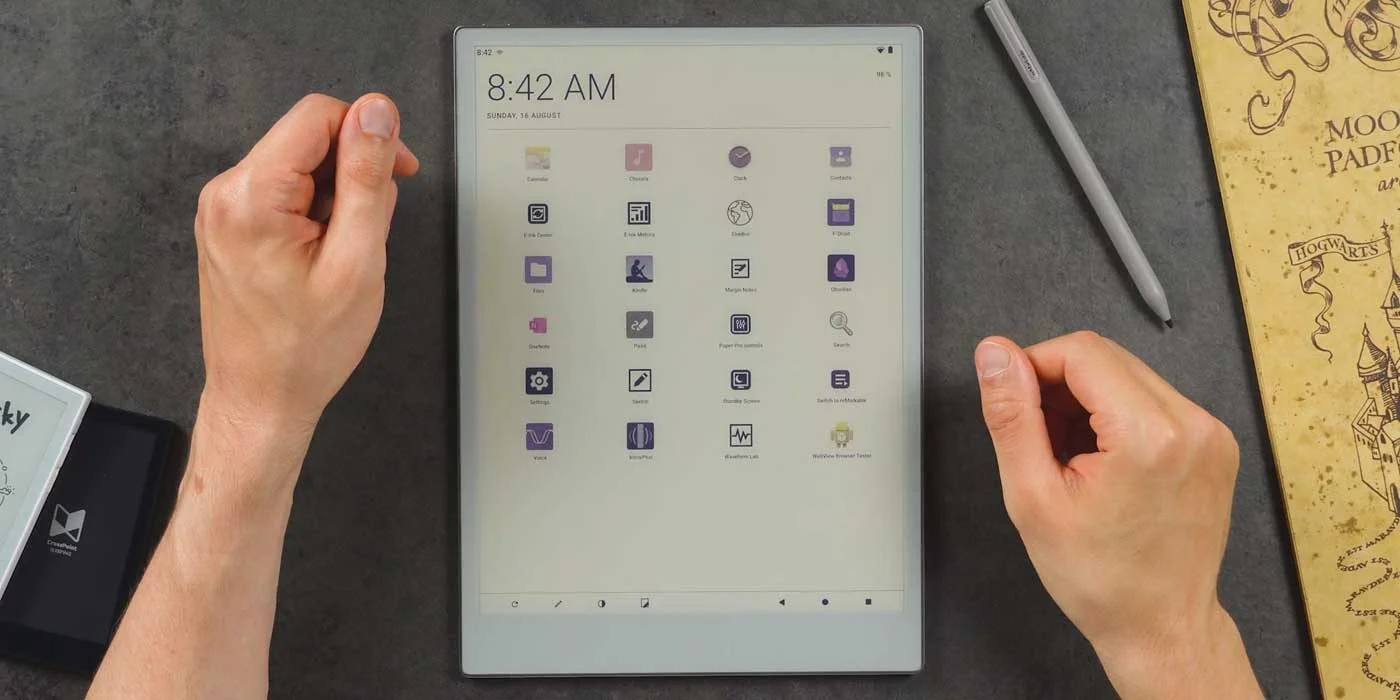
The reMarkable Paper Pro has gained attention for its ability to run Android 13, thanks to a recent YouTube demonstration by Chalid Raqami. This intriguing development raises some important questions about the practicalities of using an e-paper tablet designed primarily for focused reading and note-taking. The ability to take such a step could alter the landscape of e-paper tablets and prompt users to rethink what they expect from a device initially marketed for simplicity and concentration. This isn't just about adding new software; it's about redefining the entire purpose of the device.
The E-Reader Market Context
In the crowded e-reader market, few tablets offer Android options, with brands like Boox at the forefront. These devices typically feature a customized Android experience tailored for reading purposes, snappy interfaces, and app support tailored specifically for literature and study. In contrast, reMarkable has chosen to stick to a proprietary operating system that focuses on an uncluttered user experience, which the brand champions as critical for productivity and learning through reading or note-taking. Users appreciate that reliability in a world rife with distractions. Yet, the potential for the Paper Pro to run a full Android system opens new avenues for users who crave diversity in functionality.
Diving into the Android Experience
Chalid's recent video meticulously outlines the steps to enable Android on the device, offering a detailed view of the user experience post-installation. Despite notable hardware constraints, particularly limited RAM and processing capabilities when compared to traditional tablets, many core functions such as front light control, Wi-Fi, and Bluetooth connectivity perform adequately. This means you can navigate your device in ways familiar to anyone who's worked with Android before. However, the reality is, apps designed for larger, more capable devices won't always shine on the Paper Pro.
One of the significant benefits of this Android implementation is access to various apps previously unavailable on reMarkable’s platform, including popular e-book libraries like Kindle. This serves as a notable shift for users who may be frustrated by the limitations of a dedicated e-reader that doesn’t support their preferred applications. The ability to download and use such platforms could appeal to a demographic of users—especially those who have straddled both dedicated e-readers and multi-purpose tablets. The added flexibility may enhance user satisfaction for those looking to consolidate devices. And yet, users should be wary: access to these extra apps can lead them away from the very focus that made the reMarkable appealing in the first place.

The Trade-offs of Transitioning to Android
However, the transition to Android doesn't come without challenges. Users may face performance setbacks primarily due to the inherent limitations of e-paper technology. It's important to remember that e-paper displays don’t facilitate rapid refresh rates found on standard LCD displays. This can lead to a frustrating experience, particularly for those accustomed to quick interactions found in traditional tablets. Moreover, tuning Android for the reMarkable Paper Pro is still a work in progress. Initially, users may find the operating system sluggish and unresponsive, which could be a significant deterring factor. With ongoing memory tuning and GPU acceleration, enhancements are steadily being rolled out, but users’ patience might be tested along the way.
What adds a layer of appeal is the ability to toggle back to the original reMarkable OS quickly if the Android experience fails to live up to expectations. This safety measure is essential for those who rely on the tablet's intended purpose as a focused e-reading and note-taking device. It’s somewhat reassuring that discomfort can lead back to comfort. But here’s the thing: if the original OS is what brought you to this device in the first place, will Android’s allure even be worth the temporary inconvenience or degradation in experience?
The Bigger Picture: Implications and Significance
While the feasibility of running Android is exciting, weighing the benefits against potential distractions is vital. The reMarkable Paper Pro aims to minimize interruptions; thus, using it as an Android tablet could contradict its built-in design philosophy. Devices have distinct purposes, and expanding functionality doesn’t always translate to practical usage in daily life. For many users, the struggle between accessing more apps and staying focused could lead to conflict.
Those contemplating this modification should proceed with caution. The installation process isn’t straightforward and can be daunting, especially for less tech-savvy users. The effectiveness of the end result remains subjective; some will see increased utility, while others may find the experience overwhelming. It’s a nuanced discussion. The ability to run Android could widen the tablet's appeal, but it risks alienating the very demographic that appreciated its original simplicity.
Future Outlook for the reMarkable Paper Pro
For now, the Android port is a compelling proof of concept that showcases the Paper Pro's versatility. Yet, unless the proprietary OS changes how it interacts with updates in the future, the mainstream appeal of this Android switch could remain limited. The core consumer needs—ease of use, straightforward application, and an unwavering focus—might not align well with the complexities Android introduces. If you’re working in this space, keep an eye on how users adapt to these changes. The evolution of a device often reveals its true identity.
The future remains uncertain: Will reMarkable continue to embrace this Android capability, or will it revert back to its roots, emphasizing simplicity and minimalism? The answer will shape the product’s trajectory, influencing whether the company will capture the hearts of new users or retain its steadfast base.
Discussion
Sign in to join the discussion.