Google is unifying the Gemini features in Workspace applications, allowing users to tackle complex tasks more efficiently from any app.
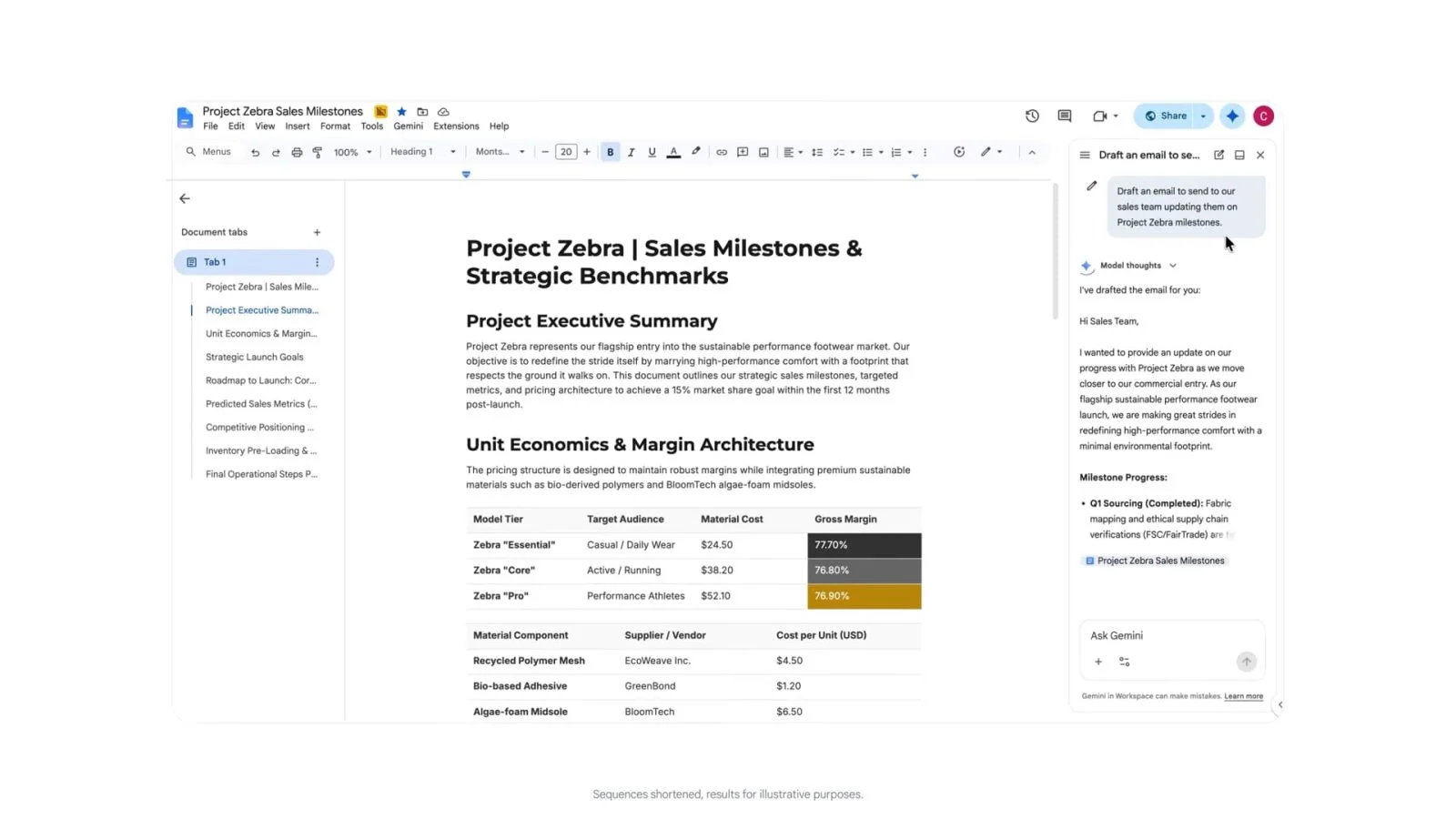
Google is making significant upgrades to the Gemini feature within its Workspace suite, enabling a more cohesive user experience across various applications. This enhancement means that users can now perform intricate, cross-application tasks without being restricted to the individual app's functionalities. The tech giant seeks to address long-standing user frustrations that arose from navigating between various platforms to accomplish workflows.
Previously, Gemini's capabilities were siloed within each specific application: for instance, generating a document required accessing Google Docs, while creating AI-driven spreadsheets necessitated being within Google Sheets. The recent changes integrate these features, making them accessible from a range of apps like Gmail, Drive, Docs, Slides, and Chat. This shift not only streamlines operations but also aligns with the consumer demand for a more integrated approach to productivity tools.
Enhanced Functionality Across Applications
With this expansion, features are consistent across all apps. Users can expect a fluid experience when navigating through different tools. In Google Chat, for instance, users can easily manage their calendars, find available meeting times, and resolve any scheduling conflicts without jumping to a different application. Imagine having calendar functionalities embedded in your chat environment—communication and scheduling can now happen in tandem.
Google Tasks has also seen enhancements, allowing users to create to-do lists or set reminders directly from any service they're currently using. The flexibility to manage tasks on the go—especially in a work environment where multitasking is common—positions Google Workspace as a serious contender against competitors like Microsoft 365. And yet, some might argue that these changes feel more like catching up than innovating.
Expanding Content Creation Capabilities
The upgraded Gemini functionality offers a variety of prompts that facilitate different tasks. Each of these prompts is designed to minimize user effort while maximizing output efficiency. For example:
- While in Gmail, a user might prompt, “Create a strategy brief for this project with goals, milestones, and next steps” to initiate a document. This fosters quick documentation without shifting contexts.
- In Gmail, they can also say, “Create a tracker for this project in a new spreadsheet” to generate a spreadsheet. This could save minutes—or even hours—if you add up multiple instances.
- From Docs, they can request, “Turn this proposal into an easy-to-read slide deck for my director using @presentation as a style reference.” This level of integration is likely to be a selling point for teams with tight deadlines.
- Users in Chat can instruct Gemini to “Create a deck outlining Project Zebra with the latest updates.” That’s right—no more waiting for someone to email you the relevant information.
- In Drive, a command could be, “Create a customer insights deck from project Zebra using my project files including sheets, reports, and emails.” This blurs the lines between data storage and content creation.
(And this is the part most people overlook) The time saved in these interactions can compound significantly over weeks or months. In environments where professionals need to juggle numerous tasks, these shortcuts in content creation represent more than just convenience—they stand to reshape how teams collaborate and share information.
Availability and User Access
This expanded feature set began its rollout this month, available to subscribers of Google AI Pro and Google AI Ultra, with some exceptions for scheduling features. The upgrades extend to various editions, including:
- Business editions: Standard and Plus
- Enterprise editions: Standard and Plus
- Other editions: Frontline Plus (scheduling functionality only)
- Education add-ons: Google AI Pro for Education
- Other add-ons: AI Expanded Access
As this strategy unfolds, Google’s transition from isolated applications to a more interconnected suite of tools could signal a pivotal shift in how organizations adopt productivity software. The implications are profound for both end-users and IT administrators.
Implications and Future Outlook
This strategic unification in Gemini features hints at Google’s broader aim to enhance user productivity and collaboration across its suite of tools. For professionals involved in project management, marketing, or any role reliant on multiple interrelated tasks, the efficiencies gained here could lead to significant improvements in workflow dynamics.
If you're working in this space, these updates might encourage you to rethink your operating procedures. However, it also raises questions—how easily can other companies replicate this success? Google’s long-term advantage could depend on their ability to continually refine and adapt these features based on user feedback. The real challenge will involve maintaining user engagement while addressing any potential teething issues that often accompany such expansive rollouts.
This isn't just about tool functionality; it’s about positioning. Tech like this could redefine user expectations and set new benchmarks in productivity tools. Organizations may find themselves questioning not only their current software choices but also how they can integrate these innovations into everyday workflows if they adopt Google’s offerings.
Discussion
Sign in to join the discussion.